
NEW Tell AI what to automate. Knetiq builds it.
Knetiq Automates...
Everything!
Knetiq connects your apps to everything you use. Powerful automation at a price that doesn't make you do a double take.
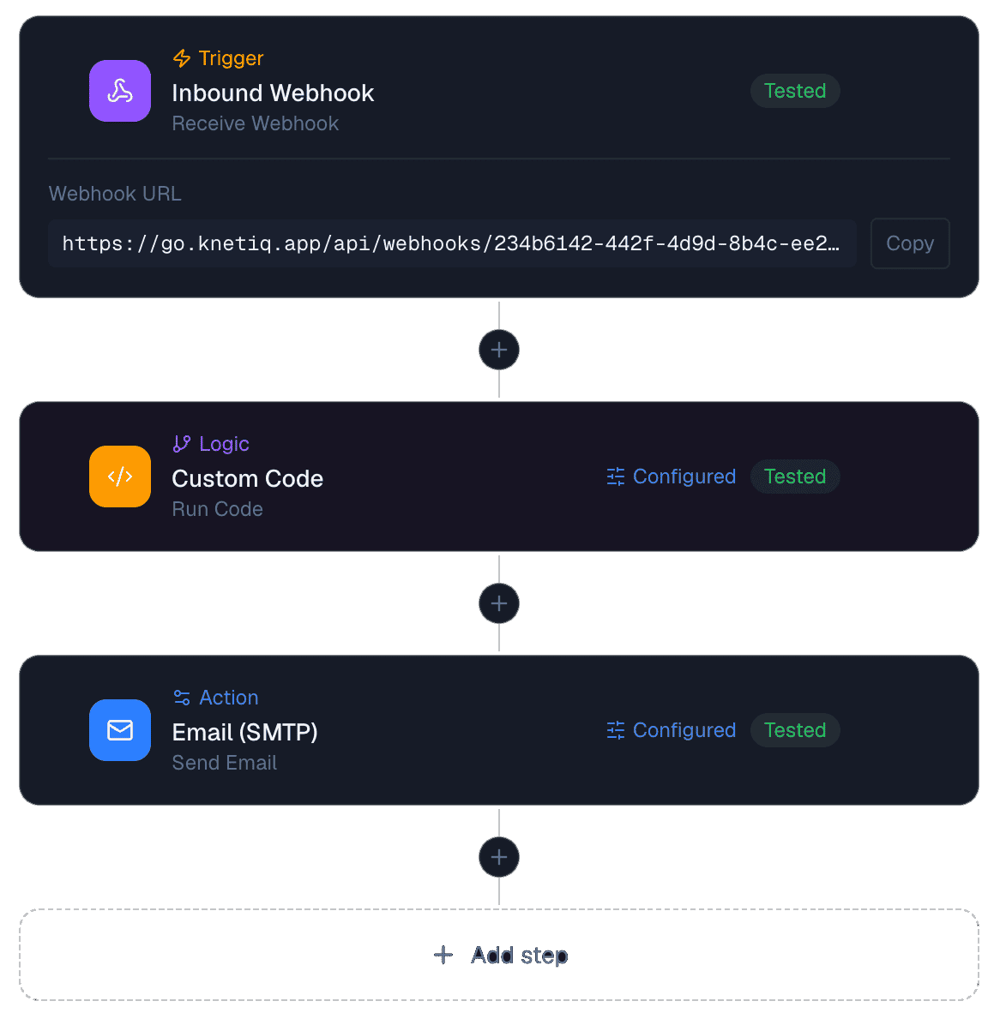
Workflow Automation, Priced Fairly
You Shouldn't Need a Budget Meeting to Automate Your Business
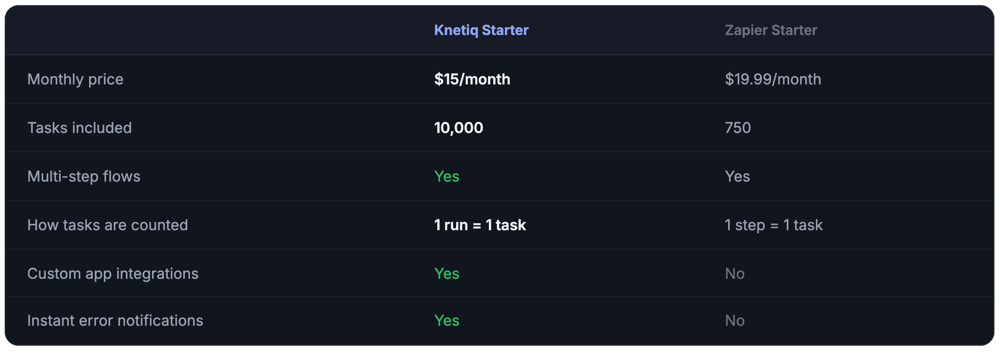
Other automation tools charge per step. So a 5-step automation costs you 5 credits. Every single time it runs. That adds up fast.
Knetiq counts differently. One automation runs, that's one credit. Period. No math, no surprises, no watching your credit count drain while you sleep.
And unlike other tools that lock you into their app library, Knetiq connects to any app with a REST API. If it has an API, you can connect it. In minutes. Without writing a single line of code.
THEIR MATH
5 steps
= 5 credits per run
KNETIQ MATH
5 steps
= 1 credit per run
AI ASSISTANT
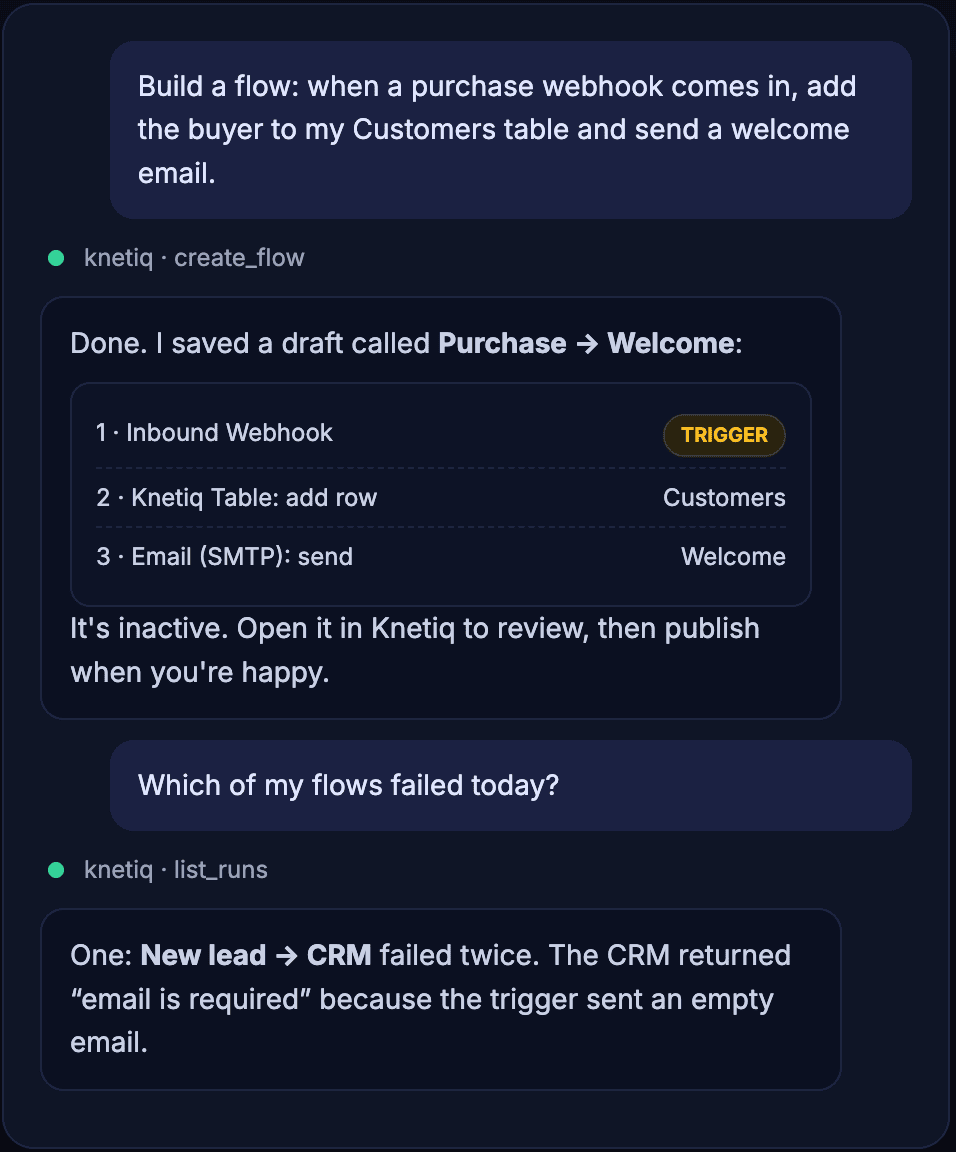
Skip the builder. Just ask.
Connect your favorite AI to your Knetiq workspace in about a minute, with one click and no keys to copy. Then run your automations the way you'd talk to a teammate.
- Build flows by describing them
- Ask it questions
- Connect any API without leaving the chat
Powerful Automation Features
Chat With Your Automations
Connect Claude and build, edit and debug flows in plain English. Everything it builds is a draft you approve.
Built-In Tables
A spreadsheet-style database inside Knetiq. Capture leads, filter and search them, export to CSV, and bulk-select to clean up, all with safe, confirm-first deletes.
Connect Any App in Minutes
Don't see your app in the list? Just grab your API docs, run them through the AI of your choice, and paste the result into Knetiq. Your custom app works exactly like a built-in one. No developers needed.
Logic That Actually Makes Sense
Filter flows, branch based on conditions, delay actions, format data. All the powerful stuff other automation tools charge extra for is just built in.
Up and Running in Under 10 Minutes
How Workflow Automation Works
01
Setup Your Trigger
The first step of your flow is a trigger. It sets the stage for the rest of your flow. This step receives the data from your origin app.
02
Build Your Flow
Pick a trigger, add your actions, map your data fields. The flow builder is clean, visual, and doesn't require a tutorial to figure out.
03
Activate and Forget It
Turn it on. Knetiq runs in the background 24/7. Check your run history anytime to see exactly what fired and what it did.
The Math Is Pretty Obvious
Same automations. A fraction of the price.
Pick Your Plan. Upgrade When You're Ready.
All plans include unlimited flows, full error notifications, and the custom integration builder.
FREE
$0
/month
Build and test your first automation
- 100 credits/month
- 1 active flow
- Webhook triggers
- Instant error notifications
- Custom integration builder
- 7-day run history
STARTER
$15
/month
For solo entrepreneurs serious about automation
- 10,000 credits/month
- 10 active flows
- Webhook triggers
- File import trigger
- 3 scheduled triggers
- Instant error notifications
- Custom integration builder
- 30-day run history
- Tables: 50,000 rows
- AI assistant + API
- Email support
PRO
$39
/month
For growing businesses with real volume
- 50,000 credits/month
- Unlimited active flows
- Webhook triggers
- File import triggers
- 25 scheduled triggers
- Instant error notifications
- Custom integration builder
- 60-day run history
- Tables: 500,000 rows
- AI assistant + API
- Priority email support
BUSINESS
$79
/month
For high volume teams who collaborate
- 200,000 credits/month
- Unlimited active flows
- Webhook triggers
- File import triggers
- Unlimited scheduled triggers
- Instant error notifications
- Custom integration builder
- 90-day run history
- Tables: 2,000,000 rows
- AI assistant + API
- Priority email support
- Team roles
Need more than 200,000 credits? Just add $5 per additional 10,000. No plan upgrade required.
Questions We'd Ask Too
Grab its API documentation, copy our AI prompt, drop it into your AI of choice, and paste the result into Knetiq. If your app has a REST API, Knetiq can connect to it. Takes about 5 minutes.
Your flows keep running. For paid plans we just add $5 per 10,000 additional credits at the end of the month. No shutoffs, no surprises.
We count credits differently: one flow run is one credit no matter how many steps it has. Also, we let you connect any REST API yourself without waiting for us to build an official integration.
Some apps can't send instant notifications when something happens. Scheduled triggers solve that by having Knetiq check those apps automatically every few minutes and fire your flow when something new shows up. Available on Pro and Business plans.
All credentials you store in Knetiq are encrypted and never exposed to the browser. Your flow data is stored securely and automatically cleaned up on a rolling basis.
Yes. Anything your AI builds is saved as a draft that doesn't run until you publish and activate it. You choose, per connection, whether it can only read, can also write drafts and data, or can publish too. It only sees the workspace you pick, it never sees your passwords or saved API keys, and you can disconnect it in one click.
Any tool that supports MCP, such as Claude Code or Cursor, can connect with an API key.
No. Credits are only used when a flow runs. Chatting with your assistant, building drafts and reading your run history are free.
Of course. Create a key, pick read-only or full access, and call the REST API from your own code. Docs and copy-paste examples are built into the app.
A built-in, spreadsheet-style database. Add a step to any flow to log data into a table, then filter it, export it to CSV, or read it through the API. Tables are included on every paid plan, with 50,000 to 2,000,000 rows depending on the plan.
Your Automations Shouldn't Cost More Than Your Software
Start free today. No credit card. No commitment. Just automation that actually makes sense.